


Kube AI Hub Federation
The multi-cluster feature relates to the network connection among multiple clusters. Therefore, it is important to understand the topological relations of clusters.
How the Multi-cluster Architecture Works
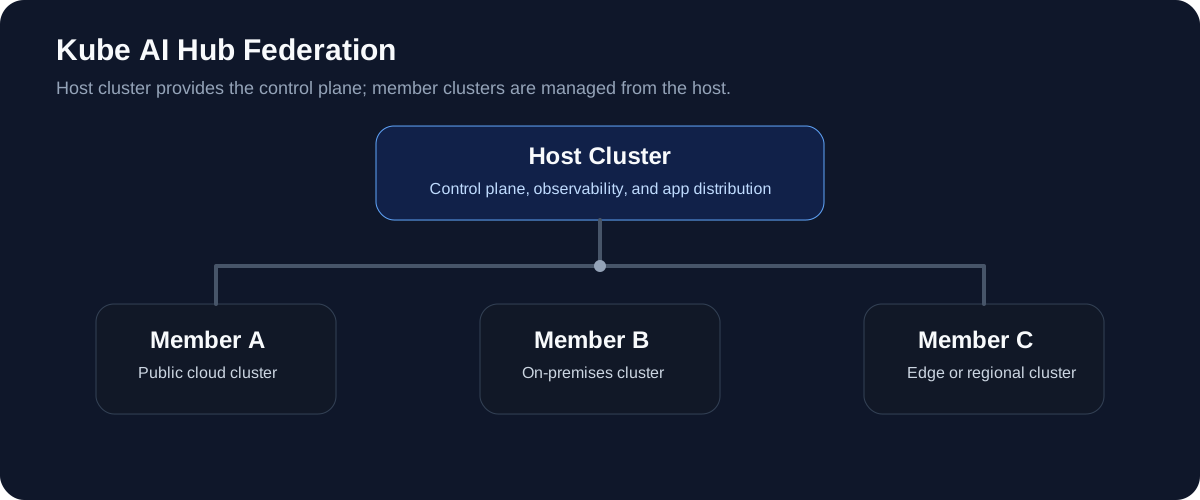
Before you use the central control plane of Kube AI Hub to manage multiple clusters, you need to create a host cluster, also known as host cluster. The host cluster, essentially, is a Kube AI Hub cluster with the multi-cluster feature enabled. It provides you with the control plane for unified management of member clusters, also known as member cluster. Member clusters are common Kube AI Hub clusters without the central control plane. Namely, tenants with necessary permissions (usually cluster administrators) can access the control plane from the host cluster to manage all member clusters, such as viewing and editing resources on member clusters. Conversely, if you access the web console of any member cluster separately, you cannot see any resources on other clusters.
There can only be one host cluster while multiple member clusters can exist at the same time. In a multi-cluster architecture, the network between the host cluster and member clusters can be connected directly or through an agent. The network between member clusters can be set in a completely isolated environment.
If you are using on-premises Kubernetes clusters built through kubeadm, install Kube AI Hub on your Kubernetes clusters by referring to Air-gapped Installation on Kubernetes, and then enable Kube AI Hub multi-cluster management through direct connection or agent connection.
Vendor Agnostic
Kube AI Hub features a powerful, inclusive central control plane so that you can manage any Kube AI Hub clusters in a unified way regardless of deployment environments or cloud providers.
Resource Requirements
Before you enable multi-cluster management, make sure you have enough resources in your environment.
| Namespace | kube-federation-system | kubesphere-system |
|---|---|---|
| Sub-component | 2 x controller-manager | tower |
| CPU Request | 100 m | 100 m |
| CPU Limit | 500 m | 500 m |
| Memory Request | 64 MiB | 128 MiB |
| Memory Limit | 512 MiB | 256 MiB |
| Installation | Optional | Optional |
Note
- The request and limit of CPU and memory resources all refer to single replica.
- After the multi-cluster feature is enabled, tower and controller-manager will be installed on the host cluster. If you use agent connection, only tower is needed for member clusters. If you use direct connection, no additional component is needed for member clusters.
Use the App Store in a Multi-cluster Architecture
Different from other components in Kube AI Hub, the Kube AI Hub App Store serves as a global application pool for all clusters, including host cluster and member clusters. You only need to enable the App Store on the host cluster and you can use functions related to the App Store on member clusters directly (no matter whether the App Store is enabled on member clusters or not), such as app templates and app repositories.
However, if you only enable the App Store on member clusters without enabling it on the host cluster, you will not be able to use the App Store on any cluster in the multi-cluster architecture.
 Previous
