


Choose Jenkins Agent
The agent section specifies where the entire Pipeline, or a specific stage, will execute in the Jenkins environment depending on where the agent section is placed. The section must be defined at the upper-level inside the pipeline block, but stage-level usage is optional. For more information, see the official documentation of Jenkins.
Built-in podTemplate
A podTemplate is a template of a Pod that is used to create agents. Users can define a podTemplate to use in the Kubernetes plugin.
As a pipeline runs, every Jenkins agent Pod must have a container named jnlp for communications between the Jenkins controller and Jenkins agent. In addition, users can add containers in the podTemplate to meet their own needs. They can choose to use their own Pod YAML to flexibly control the runtime, and the container can be switched by the container command. Here is an example.
pipeline {
  agent {
    kubernetes {
      //cloud 'kubernetes'
      label 'mypod'
      yaml """
apiVersion: v1
kind: Pod
spec:
  containers:
  - name: maven
    image: maven:3.3.9-jdk-8-alpine
    command: ['cat']
    tty: true
"""
    }
  }
  stages {
    stage('Run maven') {
      steps {
        container('maven') {
          sh 'mvn -version'
        }
      }
    }
  }
}
At the same time, Kube AI Hub has some built-in podTemplates, so that users can avoid writing YAML files, greatly reducing learning costs.
In the current version, there are 4 types of built-in podTemplates, i.e. base, nodejs, maven and go. Kube AI Hub also provides an isolated Docker environment in Pods.
You can use the built-in podTemplate by specifying the label for an agent. For example, to use the nodejs podTemplate, you can set the label to nodejs when creating the Pipeline, as shown in the example below.
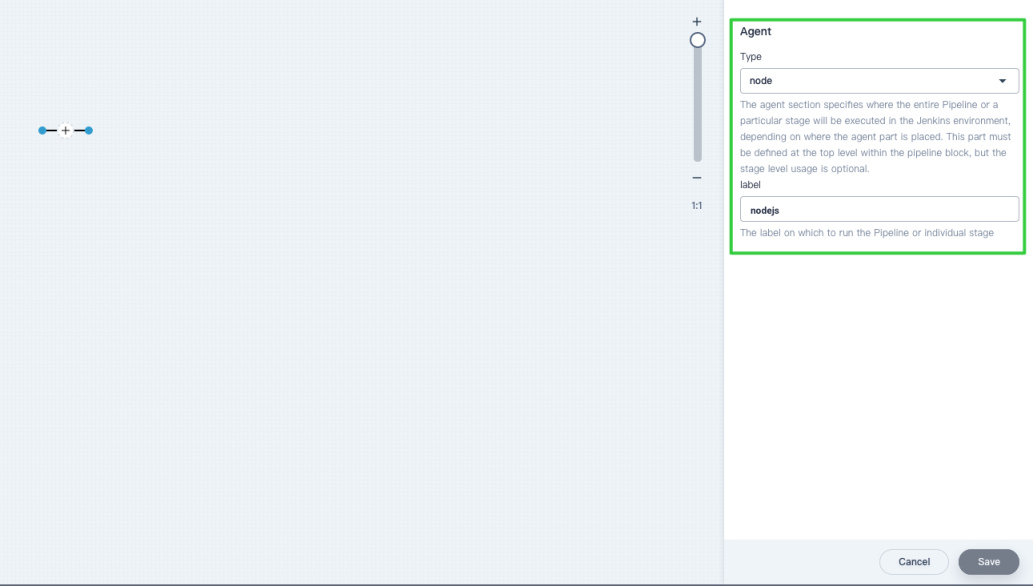
pipeline {
  agent {
    node {
      label 'nodejs'
    }
  }

  stages {
    stage('nodejs hello') {
      steps {
        container('nodejs') {
          sh 'yarn -v'
          sh 'node -v'
          sh 'docker version'
          sh 'docker images'
        }
      }
     }
   }
}
podTemplate base
| Name | Type / Version |
|---|---|
| Jenkins Agent Label | base |
| Container Name | base |
| OS | centos-7 |
| Docker | 18.06.0 |
| Helm | 2.11.0 |
| Kubectl | Stable release |
| Built-in tools | unzip, which, make, wget, zip, bzip2, git |
podTemplate nodejs
| Name | Type / Version |
|---|---|
| Jenkins Agent Label | nodejs |
| Container Name | nodejs |
| OS | centos-7 |
| Node | 9.11.2 |
| Yarn | 1.3.2 |
| Docker | 18.06.0 |
| Helm | 2.11.0 |
| Kubectl | Stable release |
| Built-in tools | unzip, which, make, wget, zip, bzip2, git |
podTemplate maven
| Name | Type / Version |
|---|---|
| Jenkins Agent Label | maven |
| Container Name | maven |
| OS | centos-7 |
| Jdk | openjdk-1.8.0 |
| Maven | 3.5.3 |
| Docker | 18.06.0 |
| Helm | 2.11.0 |
| Kubectl | Stable release |
| Built-in tools | unzip, which, make, wget, zip, bzip2, git |
podTemplate go
| Name | Type / Version |
|---|---|
| Jenkins Agent Label | go |
| Container Name | go |
| OS | centos-7 |
| Go | 1.11 |
| GOPATH | /home/jenkins/go |
| GOROOT | /usr/local/go |
| Docker | 18.06.0 |
| Helm | 2.11.0 |
| Kubectl | Stable release |
| Built-in tools | unzip, which, make, wget, zip, bzip2, git |
 Previous
